
Microsoft is retiring Exchange Web Services in Exchange Online by April 2027. Organizations must migrate to Microsoft Graph to avoid integration failures.
For years, Exchange Web Services quietly powered the hidden plumbing of countless enterprise systems.
It didn’t make headlines.
It didn’t trend on social media.
But behind the scenes, it kept emails syncing, calendars updating, backups running, and business workflows moving.
Now, that quiet workhorse is approaching retirement.
Microsoft has officially announced that Exchange Web Services (EWS) will be shut down for Exchange Online by April 2027, marking the end of an API that has served businesses for nearly two decades.
For some organizations, this will feel like a small technical adjustment.
For others — especially those with custom tools and legacy integrations — it could be a major operational shift.
This is not just another feature deprecation.
It’s a signal that Microsoft’s cloud ecosystem is evolving — fast — toward modern, secure, API-first architecture.
Let’s break down what’s happening, why it matters, and what you should do next.
The Backbone You Didn’t Know You Had
If your organization uses Microsoft 365 or Exchange Online, chances are EWS has touched your systems — even if you’ve never heard the name before.
Exchange Web Services has been the programmatic gateway into Microsoft mailboxes since the late 2000s.
Developers and tools have used it to:
-
Read and send emails
-
Sync calendars
-
Manage contacts
-
Access shared mailboxes
-
Run backups
-
Build automation scripts
-
Integrate third-party apps
In simple terms, EWS allowed software to “talk” to Exchange.
Instead of humans opening Outlook, applications could automatically fetch messages, schedule events, or extract data.
It became the glue that connected Exchange to everything else.
Backup tools.
CRM systems.
Calendar apps.
Helpdesk platforms.
Migration software.
If something automated your email environment, EWS was likely involved.
So Why Kill Something That Works?
At first glance, shutting down a widely used system seems counterproductive.
If it’s not broken, why replace it?
The answer is simple: technology doesn’t stand still.
EWS was designed for a different era.
When it launched:
-
SOAP APIs were standard
-
Cloud wasn’t mainstream
-
Security models were simpler
-
OAuth didn’t dominate
-
Mobile and SaaS ecosystems were smaller
Today, everything has changed.
Microsoft now operates one of the world’s largest cloud infrastructures, with millions of organizations depending on secure, scalable, real-time access to services.
Legacy architecture simply can’t keep up with modern demands.
EWS still works — but it’s no longer optimal.
Think of it like an old highway.
It gets you there.
But traffic has outgrown it.
Microsoft isn’t closing the road without a replacement — it’s building a faster expressway.
That expressway is Microsoft Graph.
The Big Shift: From EWS to Microsoft Graph

Microsoft Graph isn’t just another API.
It’s Microsoft’s unified gateway to the entire Microsoft 365 ecosystem.
Instead of separate interfaces for mail, files, users, Teams, SharePoint, and devices, Graph brings everything together under one modern system.
With one API, developers can access:
-
Email
-
Calendar
-
Contacts
-
Files
-
Teams chats
-
SharePoint data
-
Users
-
Devices
-
Security events
This consolidation makes development faster, simpler, and more secure.
And most importantly — Graph is built for today’s standards:
-
REST + JSON
-
OAuth 2.0 authentication
-
Token-based access
-
Granular permissions
-
Conditional access policies
-
Zero-trust architecture
Compared to Graph, EWS looks dated.
That’s why Microsoft is making the switch mandatory.
The Official Timeline You Should Know
This isn’t happening tomorrow — but it’s also not far away.
Here’s Microsoft’s phased plan:
October 2026
EWS will be disabled by default for most Exchange Online tenants.
Temporary Allow Lists
Admins can still manually enable it for specific applications if needed.
April 1, 2027
Full retirement.
No exceptions.
No overrides.
EWS in Exchange Online will permanently stop working.
Any tool still depending on it will break.
It’s that simple
Who Should Be Paying Attention?
If you only use Outlook and Teams normally, you probably won’t notice anything.
But if your organization has custom integrations, you absolutely should care.
You are likely affected if you use:
-
Backup or archiving tools
-
Calendar sync software
-
Email migration platforms
-
CRM integrations
-
Automation scripts
-
Custom in-house apps
-
Third-party mailbox analytics
-
Legacy service accounts
These often rely heavily on EWS.
And when EWS disappears, so will their connectivity.
What Happens If You Ignore This?
Let’s be blunt.
Nothing happens at first.
Everything keeps running.
Until one day — it doesn’t.
Then suddenly:
-
Backups fail
-
Sync jobs break
-
Calendars stop updating
-
Apps throw errors
-
Support tickets pile up
And IT teams scramble to diagnose something that could’ve been planned years in advance.
This isn’t a “nice to fix” issue.
It’s a business continuity risk.
The Security Argument Microsoft Is Making
Beyond modernization, there’s a bigger reason Microsoft wants to move away from EWS:
Security.
EWS was built before today’s threat landscape existed.
It wasn’t designed with:
-
Zero trust
-
Device compliance checks
-
Granular scopes
-
Conditional access rules
-
Risk-based sign-ins
Graph was.
With Graph, you can say:
“This app can only read calendars, nothing else.”
“This access only works from trusted devices.”
“This login requires MFA.”
That level of control simply wasn’t native to EWS.
In today’s world of ransomware and credential theft, that matters.
A lot.
Migration: Where Do You Start?
If you manage IT or development teams, here’s a practical approach.
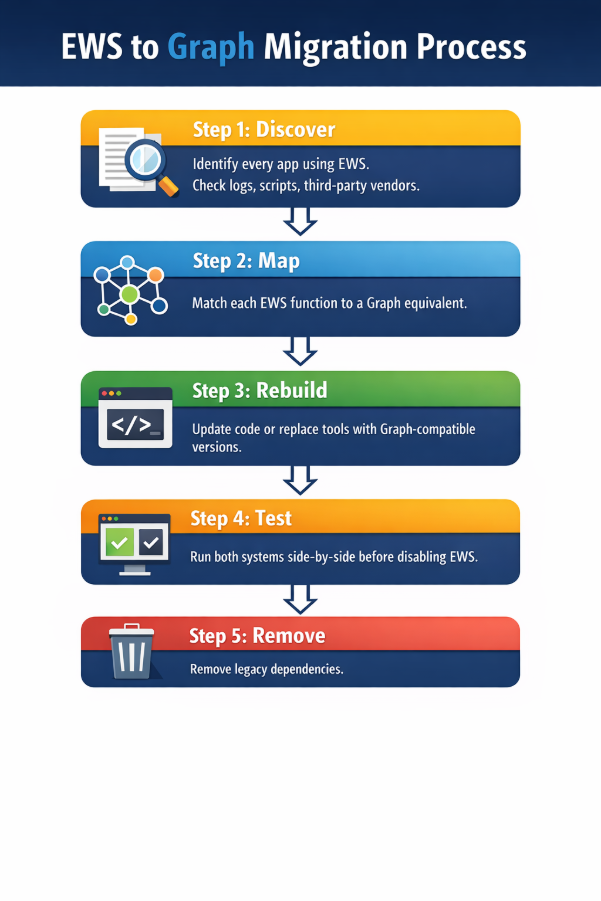
Step 1 — Discover
Identify every app using EWS.
Check logs, scripts, third-party vendors.
Step 2 — Map
Match each EWS function to a Graph equivalent.
Most features already exist in Graph.
Step 3 — Rebuild
Update code or replace tools with Graph-compatible versions.
Step 4 — Test
Run both systems side-by-side before disabling EWS.
Step 5 — Remove legacy dependencies
Fully decommission old integrations.
Starting now gives you years of runway, not months of panic.
Why This Is Actually Good News
It might sound disruptive, but there’s an upside.
Organizations migrating to Graph often discover:
-
Better performance
-
Fewer API limits
-
Cleaner authentication
-
Easier development
-
Broader capabilities
-
Stronger security posture
In many cases, teams end up with better solutions than they originally had.
This isn’t just maintenance.
It’s an upgrade opportunity.
The Bigger Picture: Microsoft’s Strategy
Zoom out, and this move fits a pattern.
Microsoft has been steadily retiring legacy tech:
-
Basic authentication
-
Old Exchange protocols
-
Legacy connectors
-
SOAP-based systems
Everything is moving toward:
-
Cloud-native
-
API-first
-
Secure-by-default
-
Unified platforms
EWS is simply the next domino.
Expect more modernization across the ecosystem in coming years.
Final Thoughts: Don’t Wait for 2027
The companies that feel this change the least will be the ones that prepare early.
Because by 2027, it won’t be a discussion.
It will be reality.
Exchange Web Services had an incredible run — nearly 20 years of enabling enterprise integrations worldwide.
But cloud platforms evolve.
And Microsoft has chosen the future.
If you depend on Exchange Online, the message is clear:
Move to Microsoft Graph. Modernize now. Stay ahead.
Because when the switch flips, there won’t be a fallback.


 Travel
  Studies
  Food
Food  Fashion
  Technology
  Health





All Comments (0)